
Community Voice
Welcome to the Spider-Fuser Community Dub Project!
This page explains how you can provide voice dubs for SpiderFuser. As the flagship title of R-USER Games, SpiderFuser is built around community involvement. That includes voice acting. If you’ve got a mic (or even just a phone) and can follow instructions, you can dub the game.
Important: Read all instructions carefully before starting. Voice submissions take more effort to review than subtitles.
How Community Voice Works
Unlike Community Subtitles, you will not submit a single audio file.
You must submit:
- A compressed archive (ZIP / 7Z / RAR / TAR.GZ)
- A folder containing multiple audio files
- A plain
.txtfile with your credit information
Getting Started with Voice Packs
-
Get the Scripts: We do NOT provide scripts for every language. You must use the original English script and translate it yourself.
Note: The "Direct Download" only contains the audio files. To see the lines you must use the Google Sheets link below.
-
Listen carefully to the original audio files.
-
Record your own versions matching:
- Timing
- Emotion
- Intent
You may use natural dialects or language-specific flavor, as long as the dialogue stays close to the original meaning.
What You’ll Need
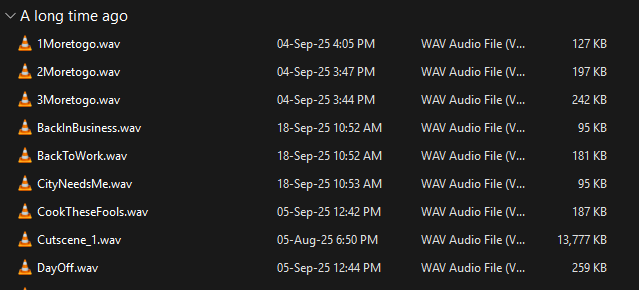
- Original voice packs
- A microphone or phone
- A quiet recording environment
- Basic audio editing (noise cleanup, trimming)
Recording requirements:
- Clear, non-distorted audio
- No background noise
- No clipping
- High quality preferred
⚠️ File names must match the original voice pack exactly.
This is non-negotiable.
What You Can’t Do
- You cannot rewrite or replace dialogues
- Minor wording changes are allowed only for native language flow
- You cannot submit raw or unedited audio
- Devs will not mix, clean, or fix recordings
- You cannot submit memes, parody, or joke dubs
- You must keep everything family-friendly
If your submission sounds like a meme dub, it will be rejected. No debate.
How to Submit Voice Packs
-
Double-check:
- File names match exactly
- Audio quality is clean
- All required lines are present
-
Create a compressed archive containing:
- One folder with all audio files
- One
.txtfile for credits
Example structure:
SpiderFuser_VoicePack_Language/
├── audio/
│ ├── dialog_001.wav
│ ├── dialog_002.wav
│ └──
└── credits.txt
Credits File (credits.txt)
Inside the text file, include:
- Your preferred credit name
- Language(s) you worked on
- Optional social links (if you want a shoutout)
Keep it simple. Plain text only.
Submission Channels
Submit via:
You can submit is via: Email and Discord
How Will You Know It’s In the Game?
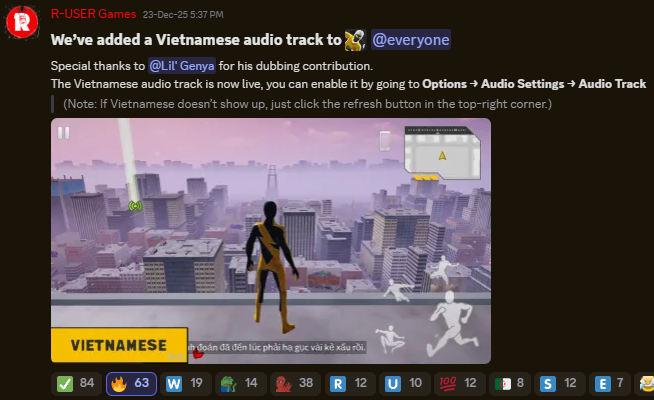
Unlike subtitles, voice submissions get public announcements.
- Devs will announce approvals on:
- Discord
- Telegram
- Your name and socials (if provided) will be shouted out
- You’ll know when your voice officially ships
Can I Do Multiple Languages?
Yes.
- You can dub multiple languages
- You can also submit English voice dubs
- Each approved language earns its own credit
Quality matters more than quantity.
Who knows?
Maybe your voice will echo through Starfall City soon.